Node.js 是什么?
Node.js = V8 引擎 + 事件驱动 I/O + 模块系统
- V8 引擎:Google Chrome 的 JavaScript 引擎(用 C++ 编写),可将 JS 通过 JIT 及时编译为机器码高速执行,同时拥有自动垃圾回收 GC
- 事件循环(Event Loop):非阻塞 I/O 模型,适合高并发场景(如 Web API、实时聊天)
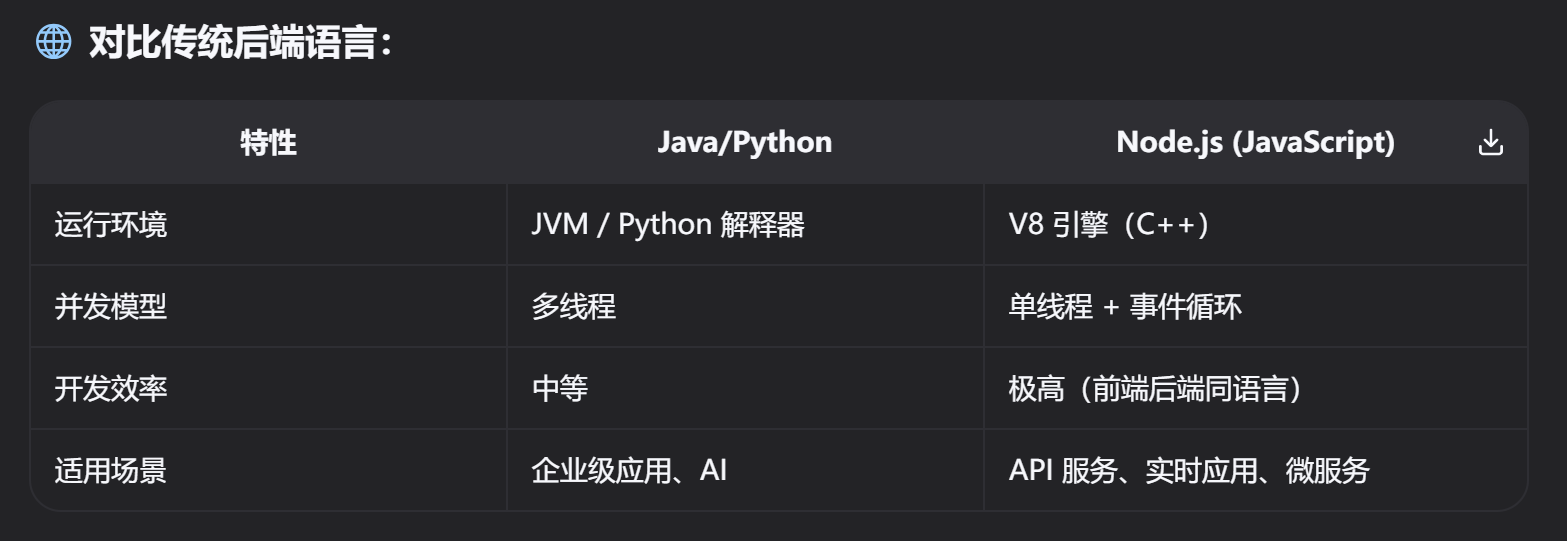
说到这里不得不提到 JS,JS 在设计之初是浏览器脚本语言,只能在浏览器中运行(因为浏览器有 JS 运行所需的 V8 引擎),NodeJS(内嵌 V8 引擎) 的出现让 JS 脱离了浏览器,让 JS 有了后端运行时,成为通用编程语言,也就是可以作为后端开发语言!
什么是 V8 引擎
V8 是 Google 开发的开源 JavaScript 和 WebAssembly 引擎,用 C++ 编写,负责将 JS 代码编译为机器码并执行
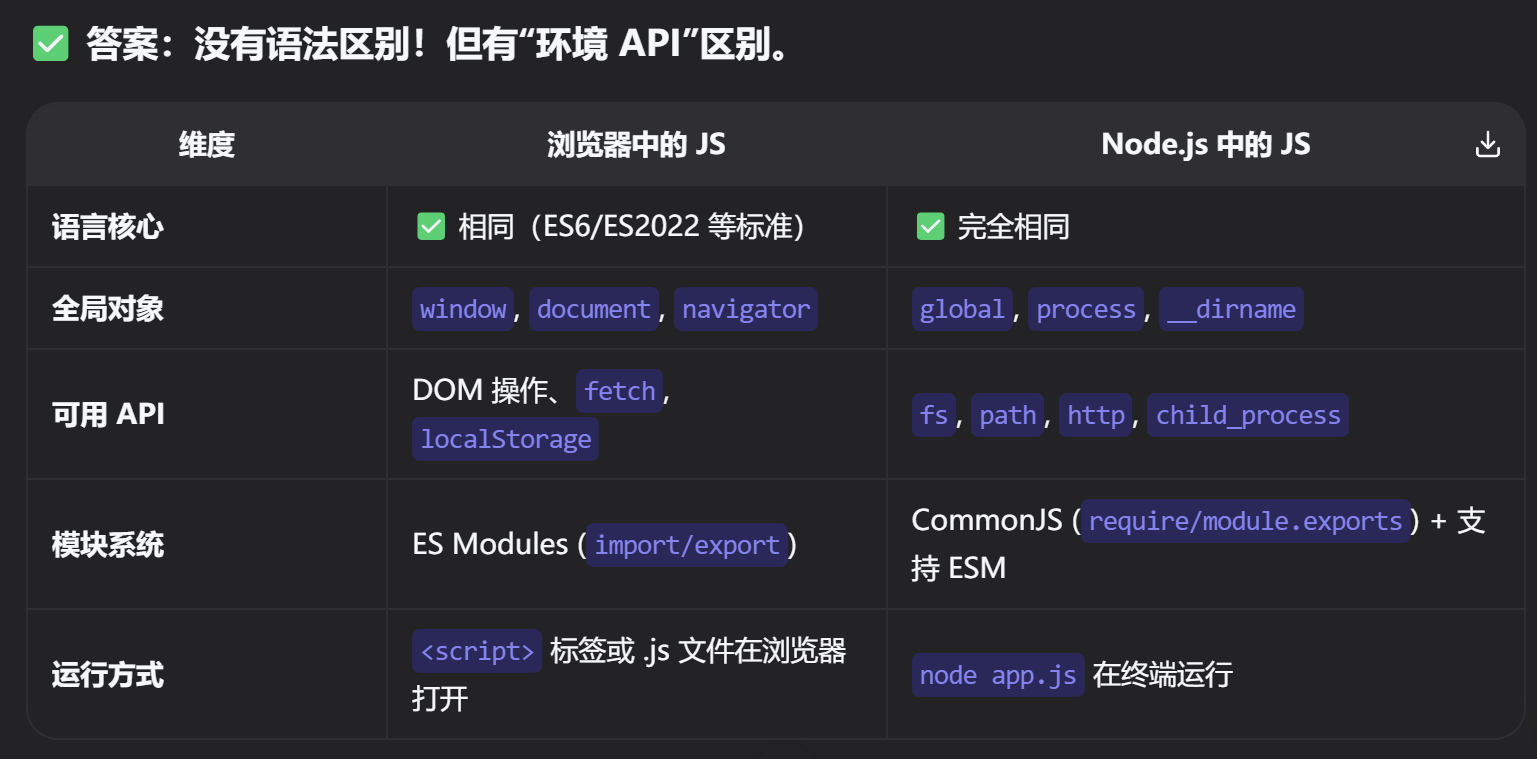
NodeJS 和 JS 区别
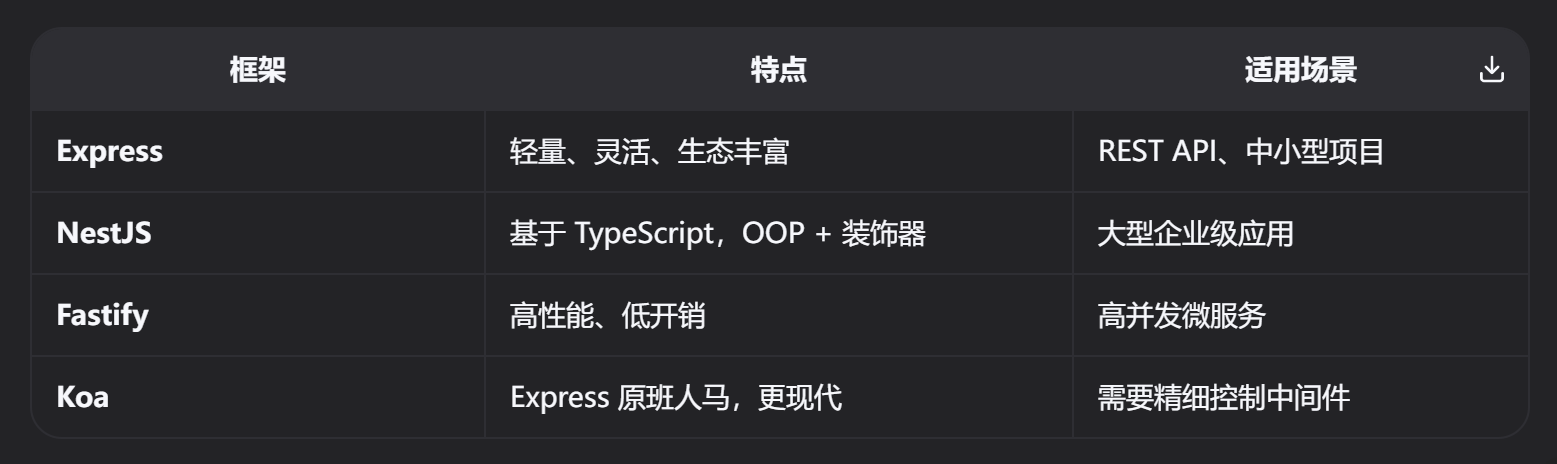
NodeJS 后端框架
JS 模块系统
JavaScript 有两种主流模块系统:
- CommonJS(Node.js 传统标准)
语法:require() / module.exports
特点:
同步加载(适合服务器)
运行时动态加载
1
2
3
4
5
6
7
|
// app.js (导入)
const { add } = require('./math');
console.log(add(2, 3)); // 5

// math.js (导出)
const add = (a, b) => a + b;
module.exports = { add };
|
- ES Modules(ECMAScript 标准,现代方案)
语法:import / export
特点:
静态分析(编译时确定依赖)
支持 tree-shaking(打包优化)
浏览器原生支持
 1
 2
 3
 4
 5
 6
 7
 8
 9
10
|
// app.js (导入)
import multiply, { add } from './math.js';
console.log(add(2, 3)); // 5
console.log(multiply(2, 3)); // 6

// math.js (导出)
export const add = (a, b) => a + b;
export default function multiply(a, b) {
	return a * b;
}
|
⚠️ 混合使用陷阱:
CommonJS 不能直接 import ESM,需动态 import()
ESM 不能直接 require CommonJS,需 createRequire()
🔑 Node.js 中如何支持两者?
- .js 文件:默认 CommonJS
- .mjs 文件 或 package.json 中 “type”: “module” → 启用 ESM
NodeJS 历史包袱
CommonJS
Node.js 诞生时,ES Modules(import/export)尚未标准化,于是采用社区方案 CommonJS(require/module.exports),导致后续 ESM 完善后在同一项目中 CommonJS 与 ESM 混用发生冲突。
回调地狱
早期 Node.js 依赖回调函数处理异步 I/O,嵌套过深导致代码难以维护,后来引入 Promise 和 async/await(Koa 框架率先采用),但旧代码仍大量存在。
 1
 2
 3
 4
 5
 6
 7
 8
 9
10
|
fs.readFile('file1.txt', 'utf8', (err, data1) => {
	if (err) throw err;
	fs.readFile('file2.txt', 'utf8', (err, data2) => {
		if (err) throw err;
		fs.writeFile('output.txt', data1 + data2, (err) => {
			if (err) throw err;
			console.log('Done!');
		});
	});
});
|
安全模型弱(无沙箱)
Node.js 默认无权限控制,任何 JS 代码可读写文件、访问网络。
1
2
3
|
// 恶意 npm 包可能恶意操作系统重要文件
require('fs').writeFileSync('/etc/passwd', 'hacked');
require('child_process').exec('rm -rf /');
|
npm 依赖地狱
node_modules 嵌套过深,依赖包重
NodeJS 项目结构
 1
 2
 3
 4
 5
 6
 7
 8
 9
10
11
12
13
14
15
16
17
18
19
20
21
22
23
24
25
|
my-node-app/
├── src/                    # 源代码目录(核心!)
│   ├── controllers/        # 路由处理器(业务逻辑)
│   ├── routes/             # API 路由定义
│   ├── models/             # 数据模型(如 Mongoose Schema)
│   ├── middleware/         # 中间件(认证、日志、错误处理)
│   ├── services/           # 业务服务层(解耦逻辑)
│   ├── utils/              # 工具函数(日期格式化、加密等)
│   └── app.js              # Express/Koa 应用实例
│
├── config/                 # 配置文件(数据库、环境变量)
│   └── db.js               # 数据库连接配置
│
├── tests/                  # 测试文件(Jest, Mocha)
│   ├── unit/               # 单元测试
│   └── integration/        # 集成测试
│
├── public/                 # 静态资源(HTML/CSS/图片,可选)
├── uploads/                # 用户上传文件(如头像)
│
├── .env                    # 环境变量(API_KEY, DB_URL)
├── .gitignore              # 忽略 node_modules 等
├── package.json            # 项目依赖 + 脚本命令
├── package-lock.json       # 依赖锁定文件
└── server.js               # 服务器入口文件(启动 HTTP 服务)
|
NodeJS 替代品
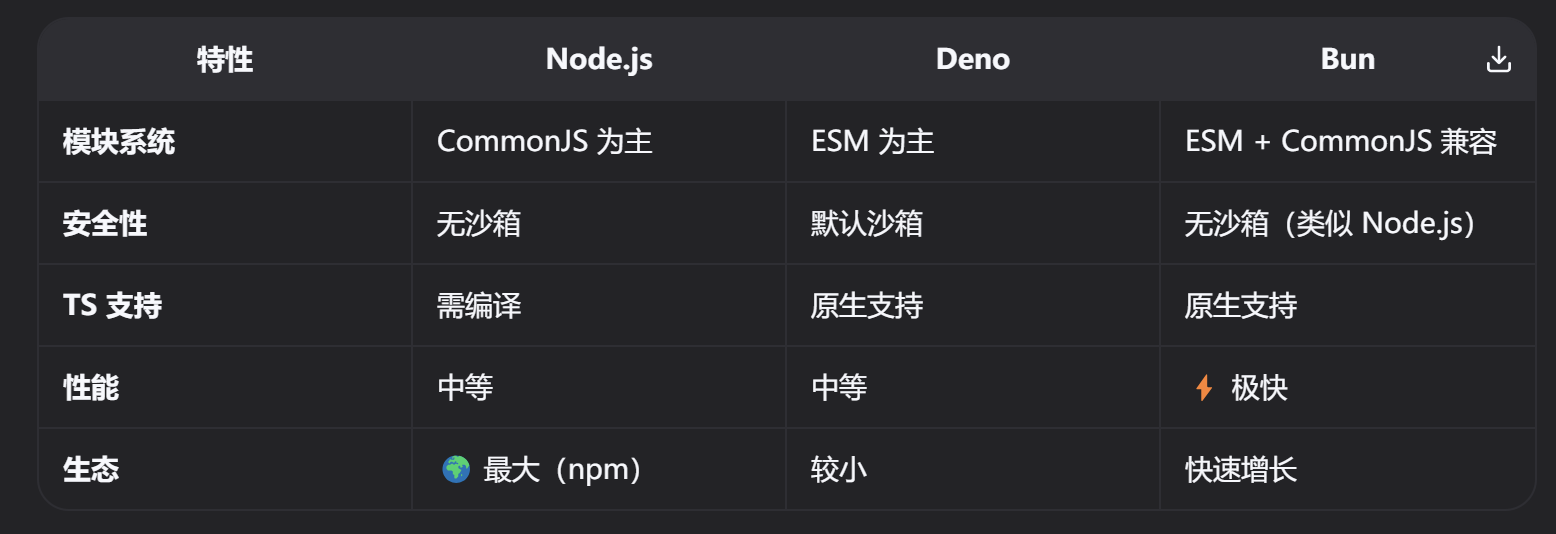
Bun 同时兼容 NestJS、Koa、Express、Fastify 框架,而 Deno 不兼容