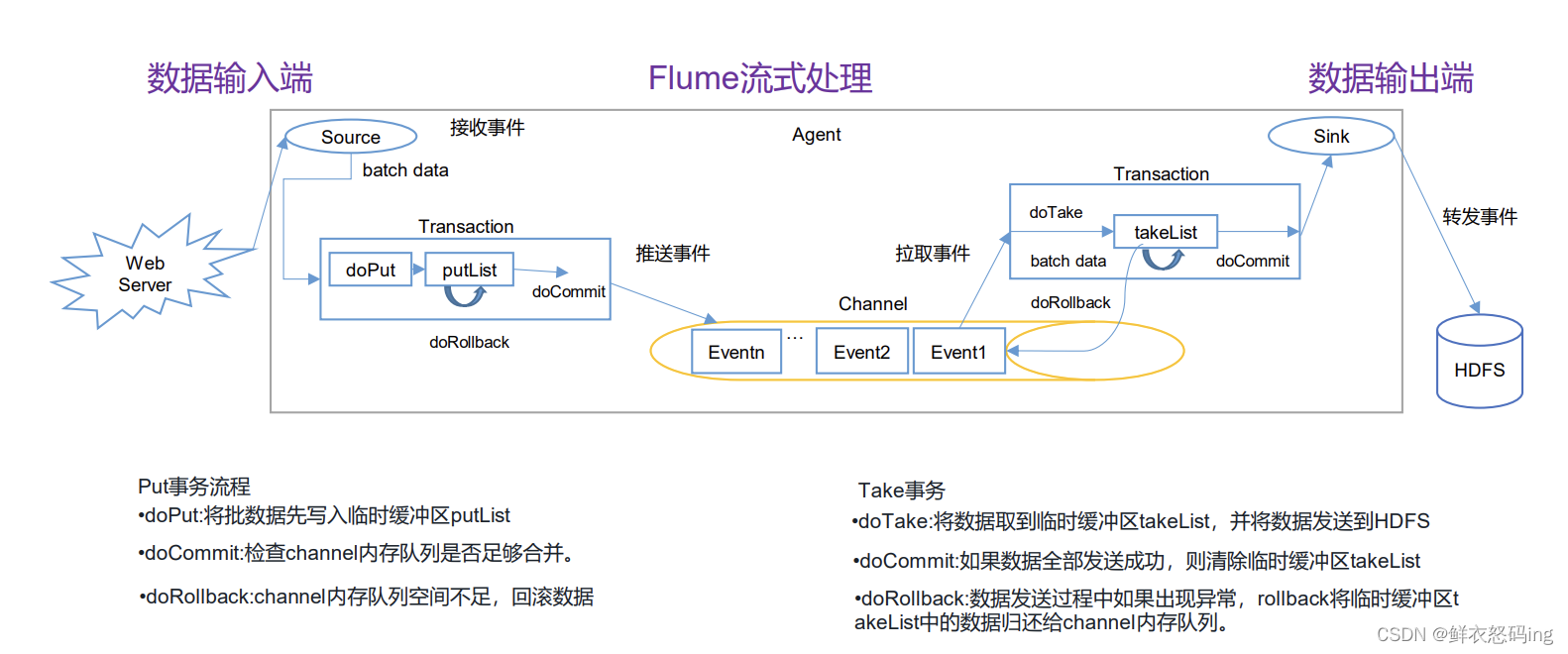
事务(Put、Take)
put 事务把数据批处理写入临时缓冲区 putList,,然后 doCommit 去检查 Channel 内存队列是否足够合并,如果不够,就回滚数据,如果够,就把 putList 的数据写入到 Channel,然后由 take 事务从 channel 中拉取,写入到临时缓冲区 takeList,然后把数据从 takeList 发送到 HDFS,发送完毕后清空缓冲区,如果某个数据发送失败,就回滚到 channel。
架构原理
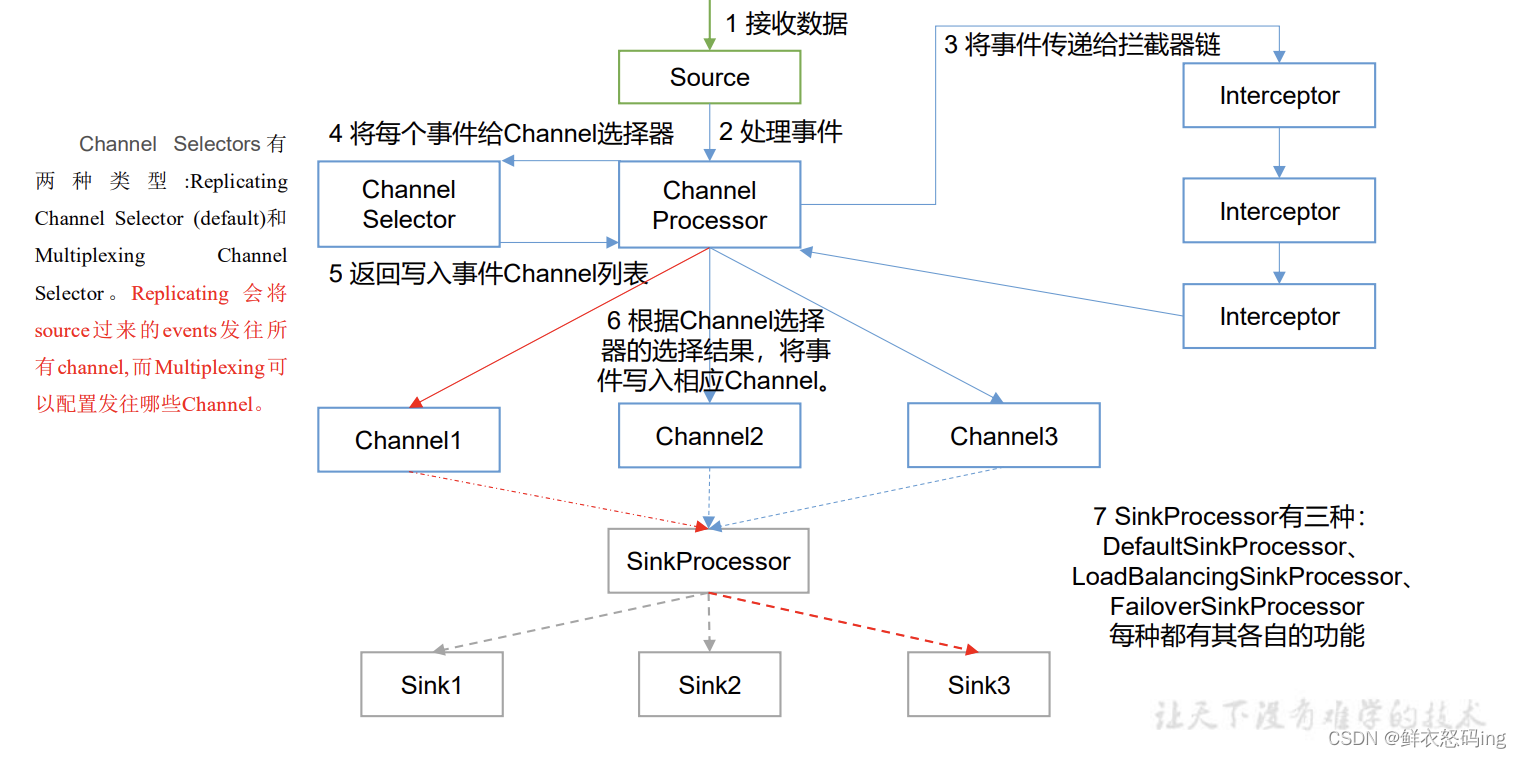
在拦截阶段可以进行数据过滤清洗,洗掉脏数据。
ChannelSelector
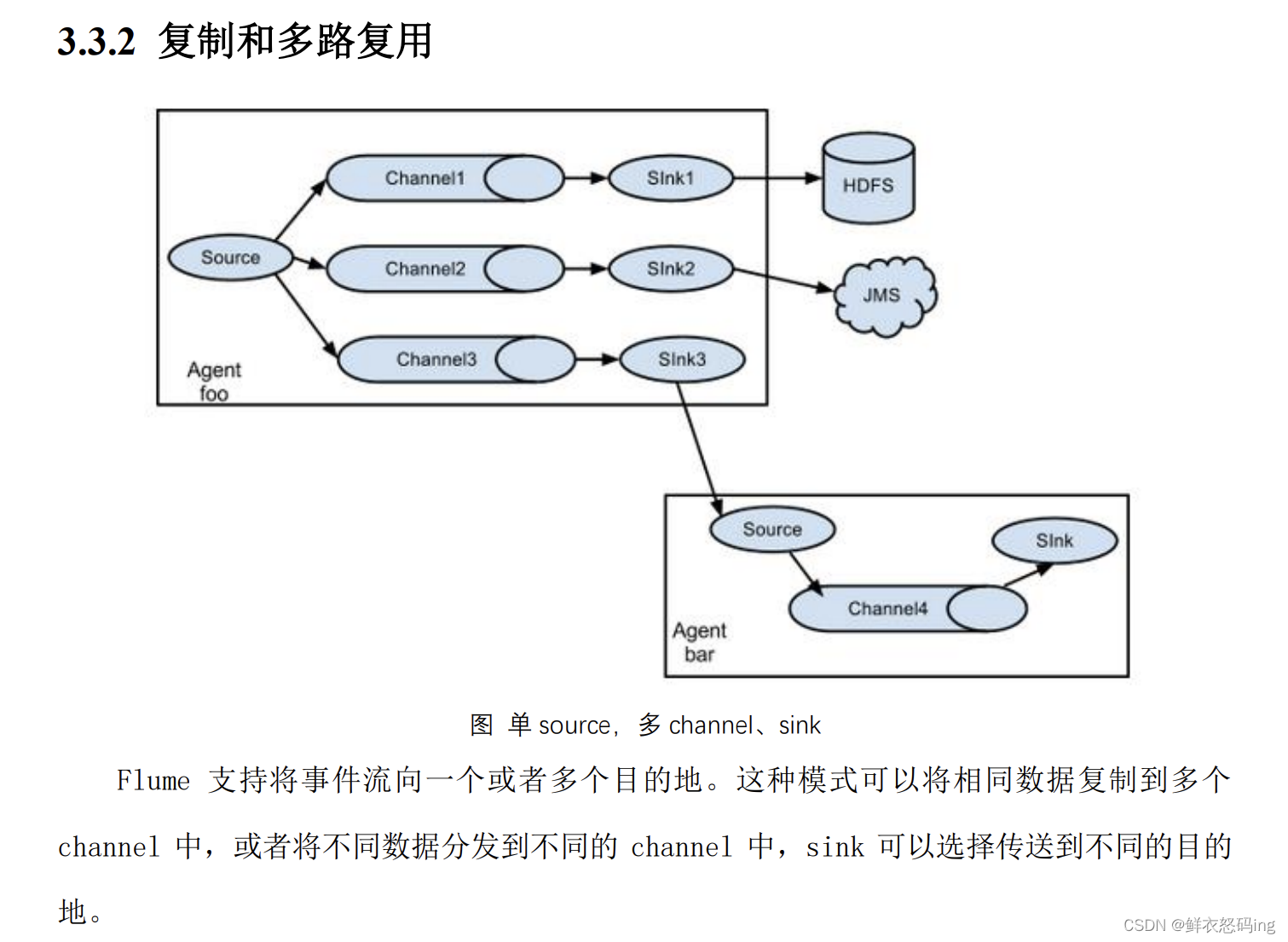
因为一个 source 可以对应对各 channel ,ChannelSelector 的作用就是选出 Event 将要被发往哪个 Channel。其共有两种类型, 分别是 Replicating(复制)和 Multiplexing(多路复用)。 ReplicatingSelector 会将同一个 Event 发往所有的 Channel,Multiplexing 会根据自定义的配置,将不同的 Event 发往不同的 Channel,Multiplexing 要结合拦截器使用,Multiplexing 会根据数据的头信息来决定发送到哪个 channel。
SinkProcessor
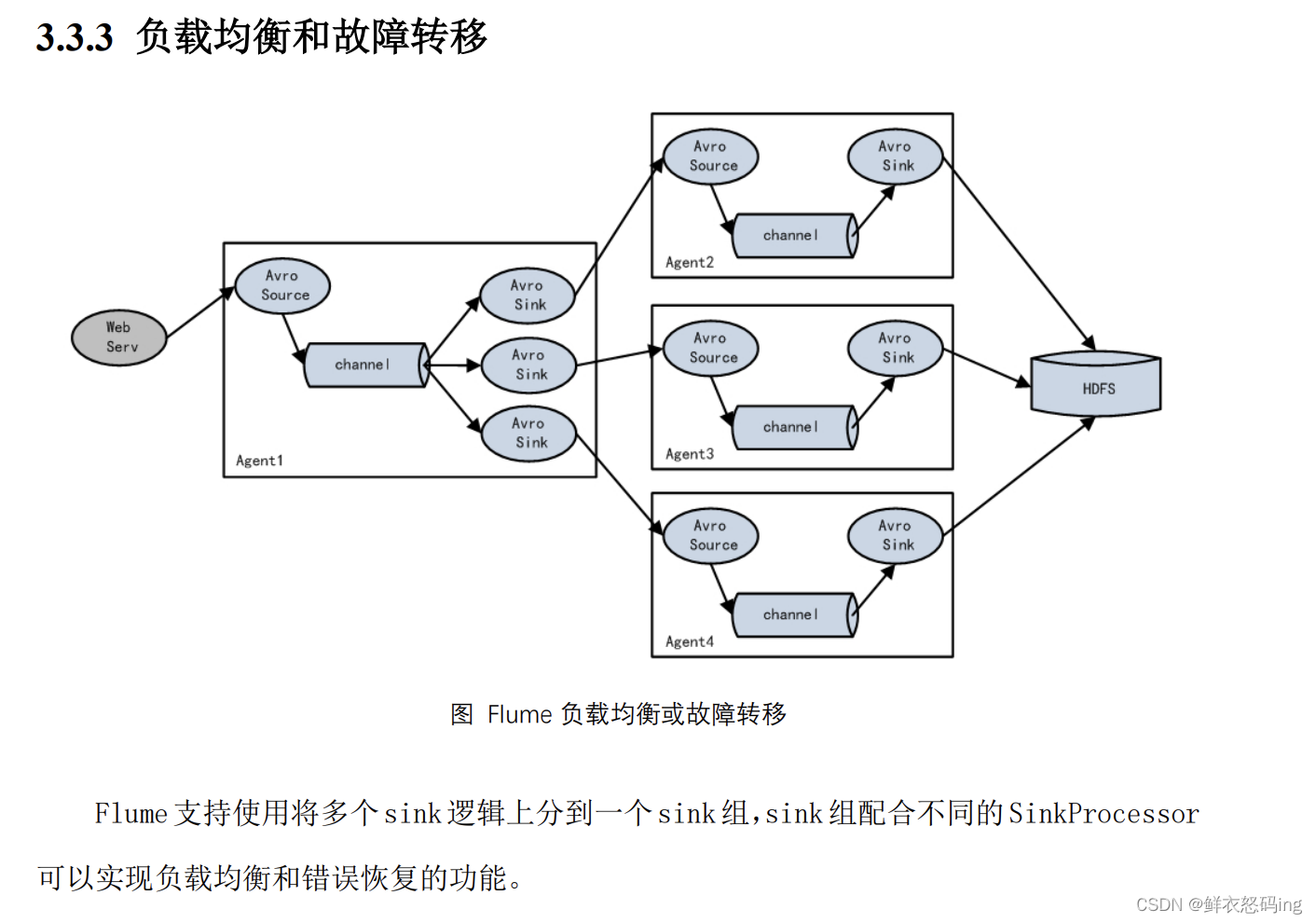
一个 sink 只能绑定一个 channel,一个 channel 能绑定多个 sink。SinkProcessor 共 有 三 种 类 型 , 分 别 是 DefaultSinkProcessor 、LoadBalancingSinkProcessor 和 FailoverSinkProcessor。
DefaultSinkProcessor 对 应 的 是 单个的 Sink , LoadBalancingSinkProcessor 和 FailoverSinkProcessor 对应的是 Sink Group,LoadBalancingSinkProcessor 可以实现负载均衡的功能,FailoverSinkProcessor 可以错误恢复的功能。
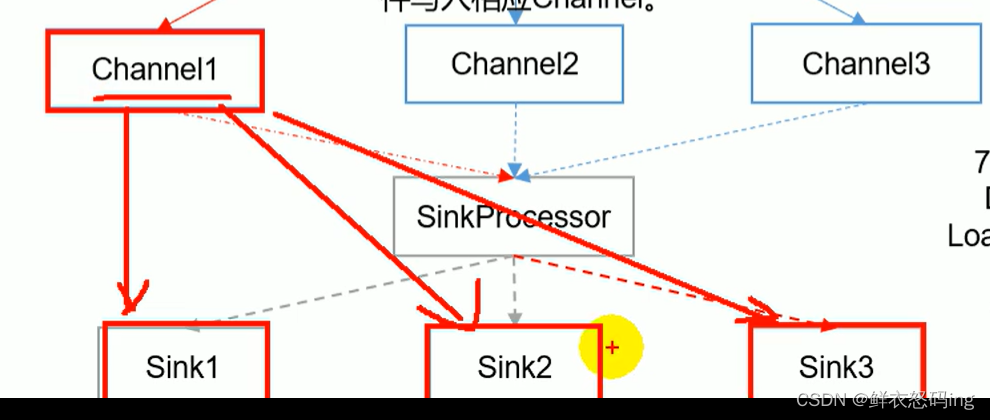
LoadBalancingSinkProcessor 负载均衡:
一个 channel 会发给多个 sink
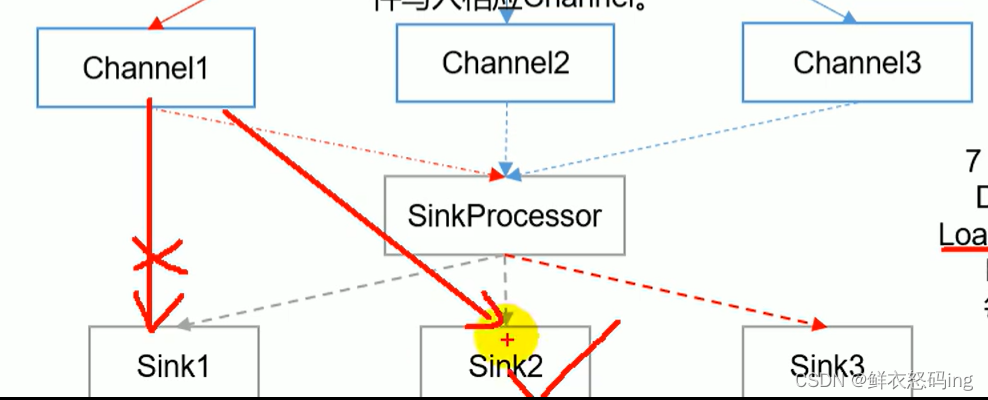
FailoverSinkProcessor 故障转移:
当一个 sink 故障,任务会转移到其他 sink
拓扑结构
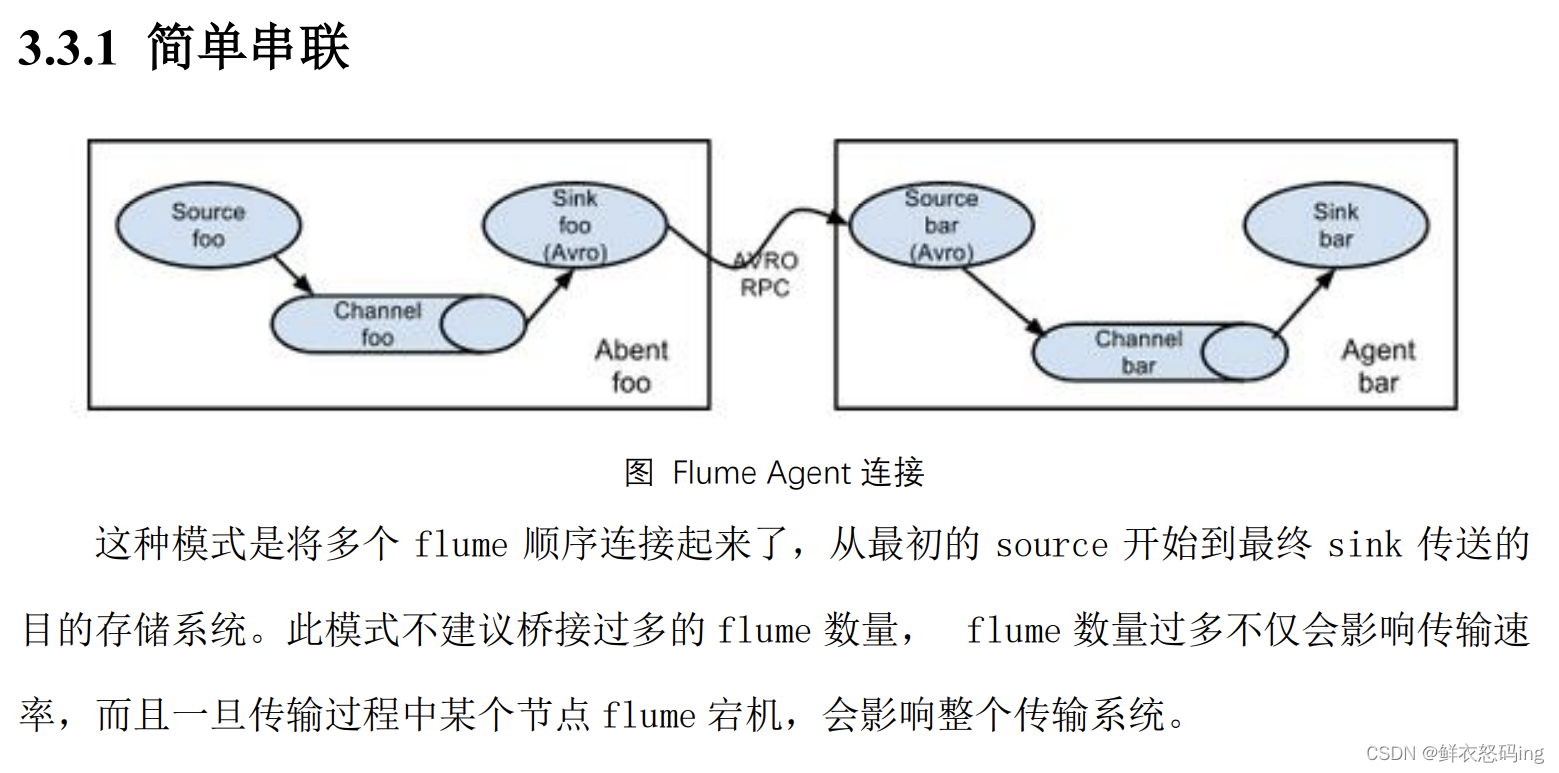
简单串联
复制和多路复用
负载均衡和故障转移
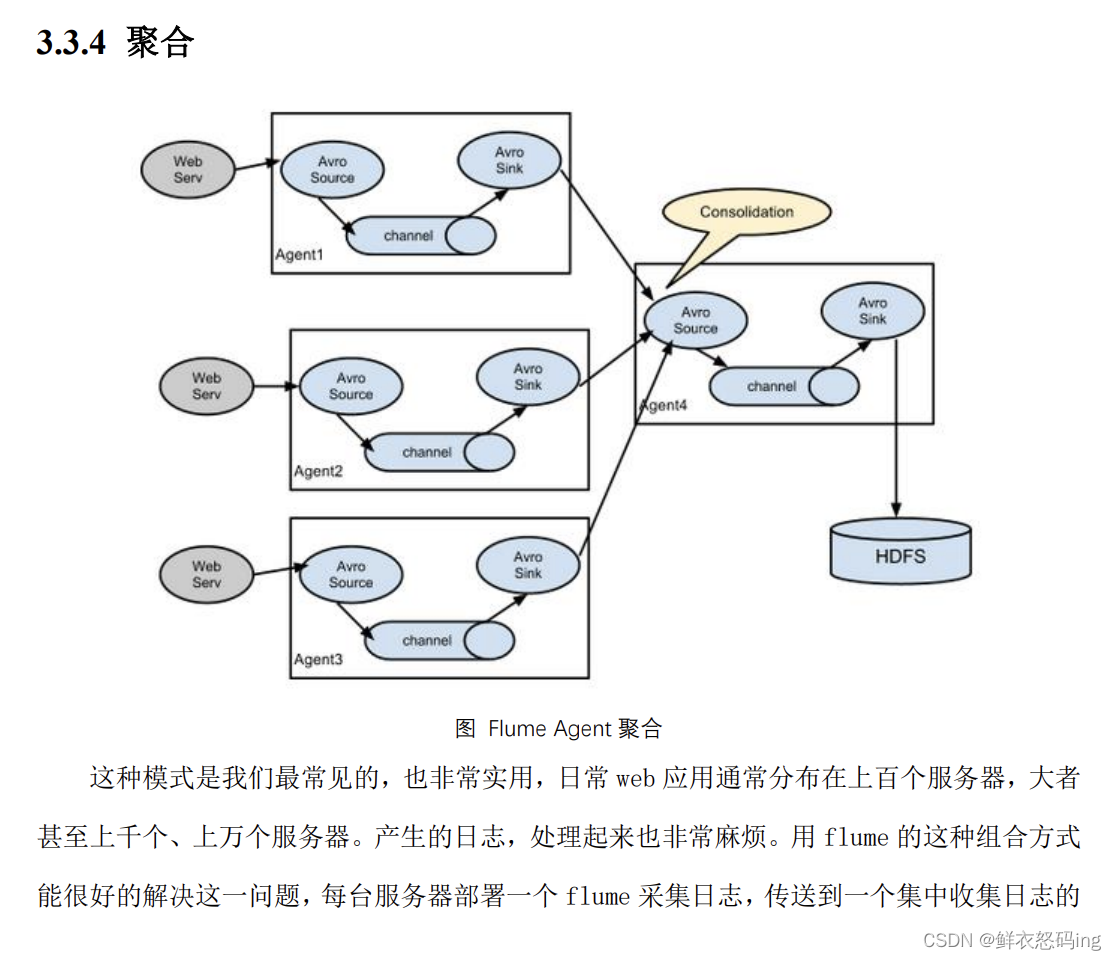
聚合
单源多出口案例
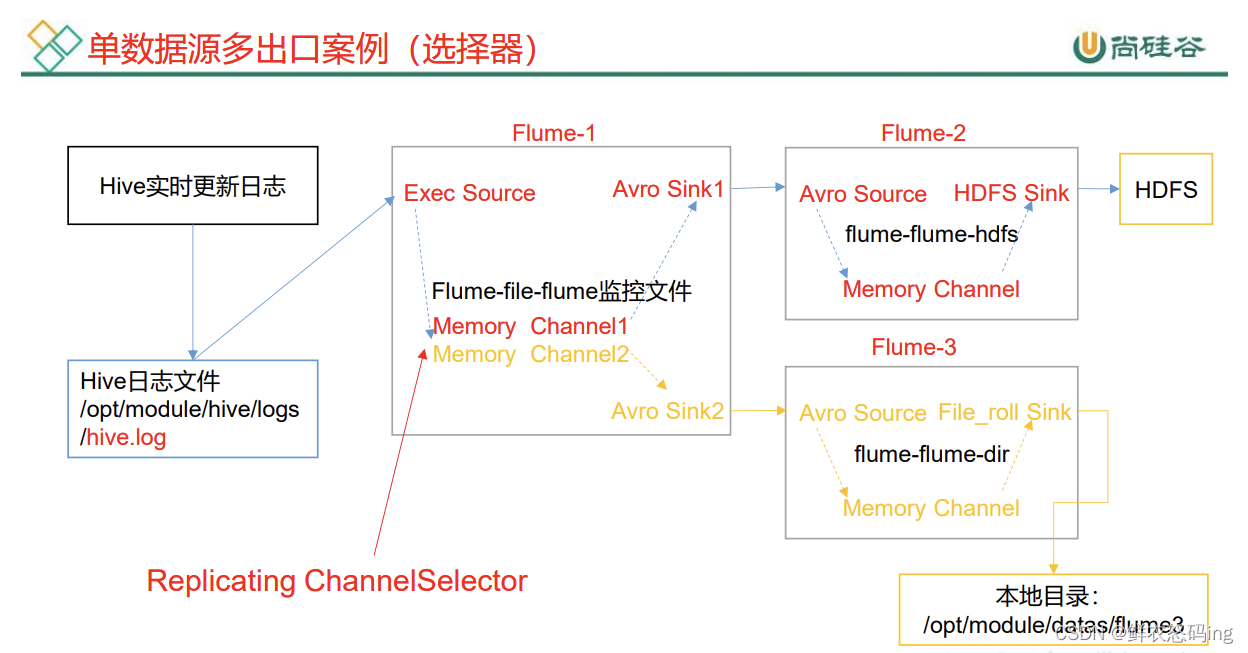
前置条件:
linux01 上启动 hive,hdfs,在 linux03 上部署 3 个 flume 任务,启动 hdfs。linux01 和 linux03 配置 ssh 免密登录。
要求:
flume1 在 linux03 监听 linux01 的 hive 日志,把 hive 日志的新内容发送给 linux03 上的 flume2 和 flume3,flume2 把内容写到 hdfs,flume3 把内容写到 linux03 的本地文件/export/server/flume/job/group1/datas 文件夹中。
剧透:
flume3 成功把 hive 日志的新内容写到 datas 文件夹,说明 linux03 确实监听到了 linux01 的 hive 日志并且成功把日志从 linux01 弄到了 linux03,但是 flume2 却没有把新内容写到 hdfs,猜想的可能是因为在 linux03 上写 flume2 的配置文件**sinks.k1.hdfs.path = hdfs://linux01:9820/flume/group1/%Y%m%d/%H,**linux01 和 linux03 是不同的服务器,跨服务器没写进去,所以建议在同一台服务器搞。
在 flume/job 目录中新建文件夹 group1 来存放本次案例的任务配置文件
1
2
3
4
5
|
mkdir group1
cd group1
vim flume-file-flume.conf
vim flume-flume-hdfs.conf
vim flume-flume-dir.conf
|
三个 conf 配置如下:
flume-file-flume.conf
 1
 2
 3
 4
 5
 6
 7
 8
 9
10
11
12
13
14
15
16
17
18
19
20
21
22
23
24
25
26
27
28
29
30
31
32
33
34
|
    # Name the components on this agent
    a1.sources = r1
    a1.sinks = k1 k2
    a1.channels = c1 c2

    # 将数据流复制给所有 channel
    a1.sources.r1.selector.type = replicating

    # Describe/configure the source
    a1.sources.r1.type = exec
    a1.sources.r1.command = ssh root@linux01 'tail -F /export/server/hive/logs/hive.log'
    #因为hive在linux01,flume在linux03,为了跨服务器监听,这里用了ssh免密登录
    a1.sources.r1.shell = /bin/bash -c

    # Describe the sink
    # sink 端的 avro 是一个数据发送者
    a1.sinks.k1.type = avro
    a1.sinks.k1.hostname = linux03
    a1.sinks.k1.port = 4141

    a1.sinks.k2.type = avro
    a1.sinks.k2.hostname = linux03
    a1.sinks.k2.port = 4142
    # Describe the channel
    a1.channels.c1.type = memory
    a1.channels.c1.capacity = 1000
    a1.channels.c1.transactionCapacity = 100
    a1.channels.c2.type = memory
    a1.channels.c2.capacity = 1000
    a1.channels.c2.transactionCapacity = 100
    # Bind the source and sink to the channel
    a1.sources.r1.channels = c1 c2
    a1.sinks.k1.channel = c1
    a1.sinks.k2.channel = c2
|
flume-flume-hdfs.conf
 1
 2
 3
 4
 5
 6
 7
 8
 9
10
11
12
13
14
15
16
17
18
19
20
21
22
23
24
25
26
27
28
29
30
|
    #Name the components on this agent
    a2.sources = r1
    a2.sinks = k1
    a2.channels = c1
    #Describe/configure the source
    #source 端的 avro 是一个数据接收服务
    a2.sources.r1.type = avro
    a2.sources.r1.bind = linux03
    a2.sources.r1.port = 4141
    #Describe the sink
    a2.sinks.k1.type = hdfs
    a2.sinks.k1.hdfs.path = hdfs://linux01:9820/flume/group1/%Y%m%d/%H #这里在 linux03 把路径配置为 linux01 的 hdfs,可能就是出错原因
    #上传文件的前缀
    a2.sinks.k1.hdfs.filePrefix = group1- #是否按照时间滚动文件夹
    a2.sinks.k1.hdfs.round = true #多少时间单位创建一个新的文件夹
    a2.sinks.k1.hdfs.roundValue = 1 #重新定义时间单位
    a2.sinks.k1.hdfs.roundUnit = hour #是否使用本地时间戳
    a2.sinks.k1.hdfs.useLocalTimeStamp = true #积攒多少个 Event 才 flush 到 HDFS 一次
    a2.sinks.k1.hdfs.batchSize = 100 #设置文件类型,可支持压缩
    a2.sinks.k1.hdfs.fileType = DataStream #多久生成一个新的文件
    a2.sinks.k1.hdfs.rollInterval = 30 #设置每个文件的滚动大小大概是 128M
    a2.sinks.k1.hdfs.rollSize = 134217700 #文件的滚动与 Event 数量无关
    a2.sinks.k1.hdfs.rollCount = 0
    #Describe the channel
    a2.channels.c1.type = memory
    a2.channels.c1.capacity = 1000
    a2.channels.c1.transactionCapacity = 100
    #Bind the source and sink to the channel
    a2.sources.r1.channels = c1
    a2.sinks.k1.channel = c1
|
flume-flume-dir.conf
 1
 2
 3
 4
 5
 6
 7
 8
 9
10
11
12
13
14
15
16
17
18
|
    #Name the components on this agent
    a3.sources = r1
    a3.sinks = k1
    a3.channels = c2
    # Describe/configure the source
    a3.sources.r1.type = avro
    a3.sources.r1.bind = linux03
    a3.sources.r1.port = 4142
    # Describe the sink
    a3.sinks.k1.type = file_roll
    a3.sinks.k1.sink.directory = /export/server/flume/job/group1/datas
    # Describe the channel
    a3.channels.c2.type = memory
    a3.channels.c2.capacity = 1000
    a3.channels.c2.transactionCapacity = 100
    # Bind the source and sink to the channel
    a3.sources.r1.channels = c2
    a3.sinks.k1.channel = c2
|
3 个配置文件写好后,在 linux03 启动 hdfs,然后在 flume 文件夹下启动三个 flume 任务
flume-ng agent -c conf/ -n a3 -f job/group1/flume-flume-dir.conf
flume-ng agent -c conf/ -n a2 -f job/group1/flume-flume-hdfs.conf
flume-ng agent -c conf/ -n a1 -f job/group1/flume-file-flume.conf
在 linux01 启动 hdfs ,然后启动 hivemetastore 和 hive,开始操作 hive,就会产生 hive 日志记录在 hive.log。
注意!hive.log 没产生新内容可能是因为 hive 日志配置出错,去 conf 文件夹找 hive-log4j2.properties,找到 hive.log.dir。修改成自己的 logs 路径,默认路径可能要用到 hive 环境变量,如果环境变量没有就直接写绝对路径。
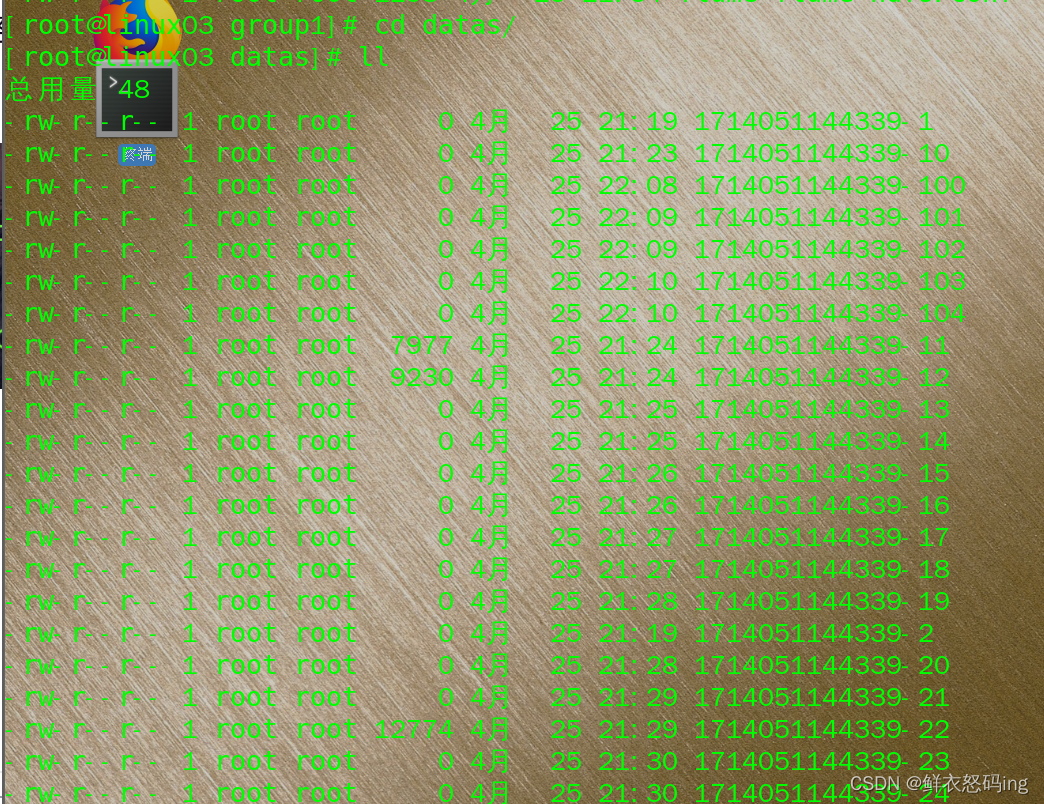
 datas 确实产生了新文件,但是有很多空的,不知道咋回事,可能是任务配置问题。
故障转移案例
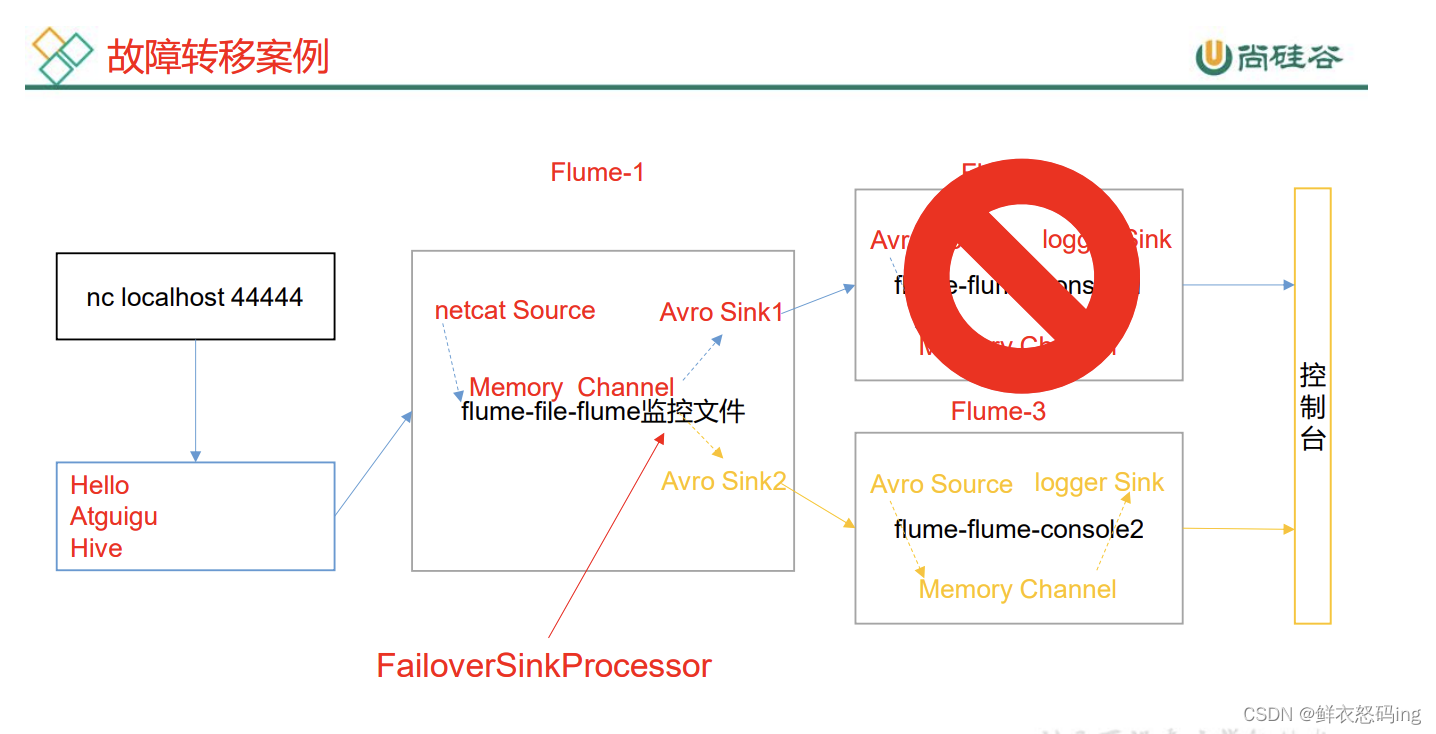
前置:确保 4142、4141、44444 端口没被占用
在 linux03 的 flume/job 目录建 group2 文件夹,里面有如下 3 个配置文件:
flume-flume-console1.conf
 1
 2
 3
 4
 5
 6
 7
 8
 9
10
11
12
13
14
15
16
17
|
    # Name the components on this agent
    a2.sources = r1
    a2.sinks = k1
    a2.channels = c1
    # Describe/configure the source
    a2.sources.r1.type = avro
    a2.sources.r1.bind = linux03
    a2.sources.r1.port = 4141
    # Describe the sink
    a2.sinks.k1.type = logger
    # Describe the channel
    a2.channels.c1.type = memory
    a2.channels.c1.capacity = 1000
    a2.channels.c1.transactionCapacity = 100
    # Bind the source and sink to the channel
    a2.sources.r1.channels = c1
    a2.sinks.k1.channel = c1
|
flume-flume-console2.conf
 1
 2
 3
 4
 5
 6
 7
 8
 9
10
11
12
13
|
    #Name the components on this agent
    a3.sources = r1
    a3.sinks = k1
    a3.channels = c2 # Describe/configure the source
    a3.sources.r1.type = avro
    a3.sources.r1.bind = linux03
    a3.sources.r1.port = 4142 # Describe the sink
    a3.sinks.k1.type = logger # Describe the channel
    a3.channels.c2.type = memory
    a3.channels.c2.capacity = 1000
    a3.channels.c2.transactionCapacity = 100 # Bind the source and sink to the channel
    a3.sources.r1.channels = c2
    a3.sinks.k1.channel = c2
|
flume-netcat-flume.conf
 1
 2
 3
 4
 5
 6
 7
 8
 9
10
11
12
13
14
15
16
17
18
19
20
21
22
23
24
25
26
27
28
29
30
31
32
33
34
|
    # Name the components on this agent
    a1.sources = r1
    a1.channels = c1
    a1.sinkgroups = g1
    a1.sinks = k1 k2
    # Describe/configure the source
    a1.sources.r1.type = netcat
    a1.sources.r1.bind = localhost
    a1.sources.r1.port = 44444


    a1.sinkgroups.g1.processor.type = failover
    a1.sinkgroups.g1.processor.priority.k1 = 5
    a1.sinkgroups.g1.processor.priority.k2 = 10
    #配置优先级,k1=5,优先级更高,因此数据会优先发给k1,当k1故障时,才会转移到k2
    a1.sinkgroups.g1.processor.maxpenalty = 10000


    # Describe the sink
    a1.sinks.k1.type = avro
    a1.sinks.k1.hostname = linux03
    a1.sinks.k1.port = 4141
    a1.sinks.k2.type = avro
    a1.sinks.k2.hostname = linux03
    a1.sinks.k2.port = 4142
    # Describe the channel
    a1.channels.c1.type = memory
    a1.channels.c1.capacity = 1000
    a1.channels.c1.transactionCapacity = 100
    # Bind the source and sink to the channel
    a1.sources.r1.channels = c1
    a1.sinkgroups.g1.sinks = k1 k2
    a1.sinks.k1.channel = c1
    a1.sinks.k2.channel = c1
|
分别启动 3 个任务
1)flume-ng agent -c conf/ -n a3 -f job/group2/flume-flume-console2.conf -Dflume.root.logger=INFO,console
2)flume-ng agent -c conf/ -n a2 -f job/group2/flume-flume-console1.conf -Dflume.root.logger=INFO,console
3)flume-ng agent -c conf/ -n a1 -f job/group2/flume-netcat-flume.conf
运行 nc localhost 44444 并发送内容:
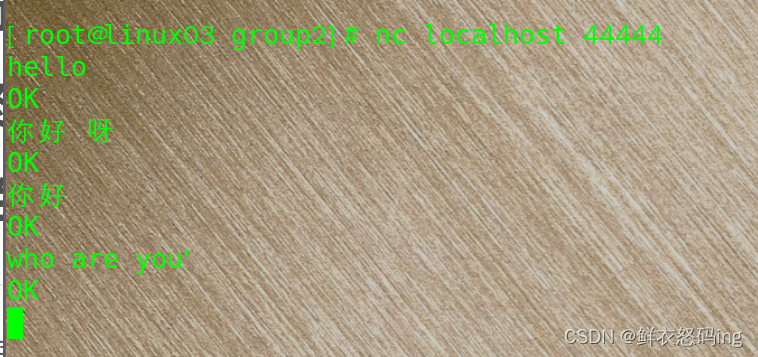 在 console2 接收到(发送的汉字显示……)
 找到 flume 进程,制造故障杀死 console2 任务,此时发生故障 ,任务会转移到 console1:
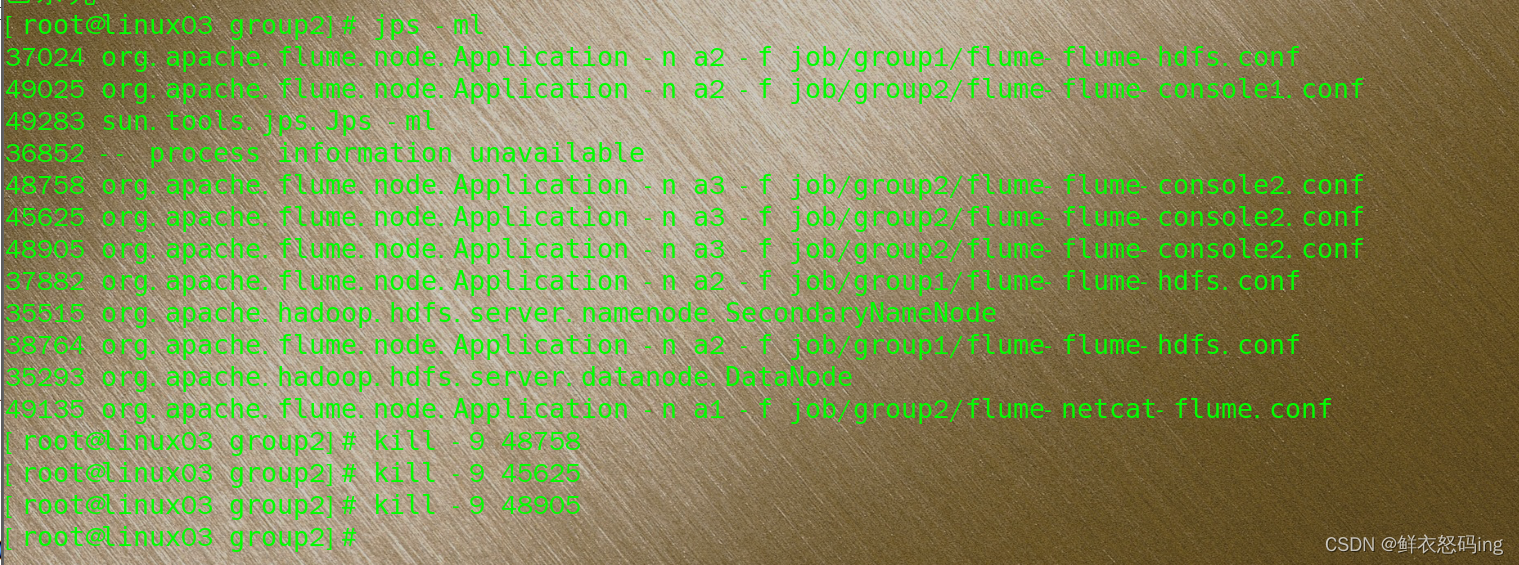 可以看到 console2 被杀死
 继续发送数据,数据被 console1 接收
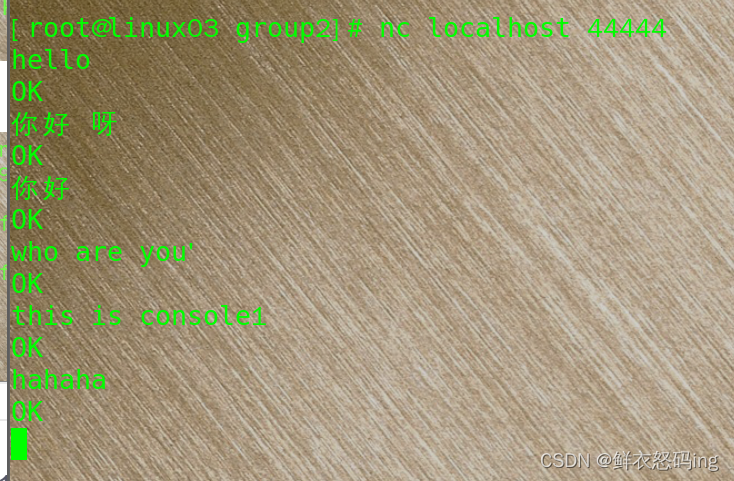 console1 接收成功 。

负载均衡案例
尚硅谷 P25
 1
 2
 3
 4
 5
 6
 7
 8
 9
10
11
12
13
14
15
16
17
18
19
20
21
22
23
24
25
26
|
    # Name the components on this agent
    a1.sources = r1
    a1.channels = c1
    a1.sinkgroups = g1
    a1.sinks = k1 k2
    # Describe/configure the source
    a1.sources.r1.type = netcat
    a1.sources.r1.bind = localhost
    a1.sources.r1.port = 44444
    a1.sinkgroups.g1.processor.type = load_balance
    # Describe the sink
    a1.sinks.k1.type = avro
    a1.sinks.k1.hostname = linux03
    a1.sinks.k1.port = 4141
    a1.sinks.k2.type = avro
    a1.sinks.k2.hostname = linux03
    a1.sinks.k2.port = 4142
    # Describe the channel
    a1.channels.c1.type = memory
    a1.channels.c1.capacity = 1000
    a1.channels.c1.transactionCapacity = 100
    # Bind the source and sink to the channel
    a1.sources.r1.channels = c1
    a1.sinkgroups.g1.sinks = k1 k2
    a1.sinks.k1.channel = c1
    a1.sinks.k2.channel = c1
|
配置文件和故障转移案例一样,只有 flume-netcat-flume.conf 需要改。
Flume 聚合案例
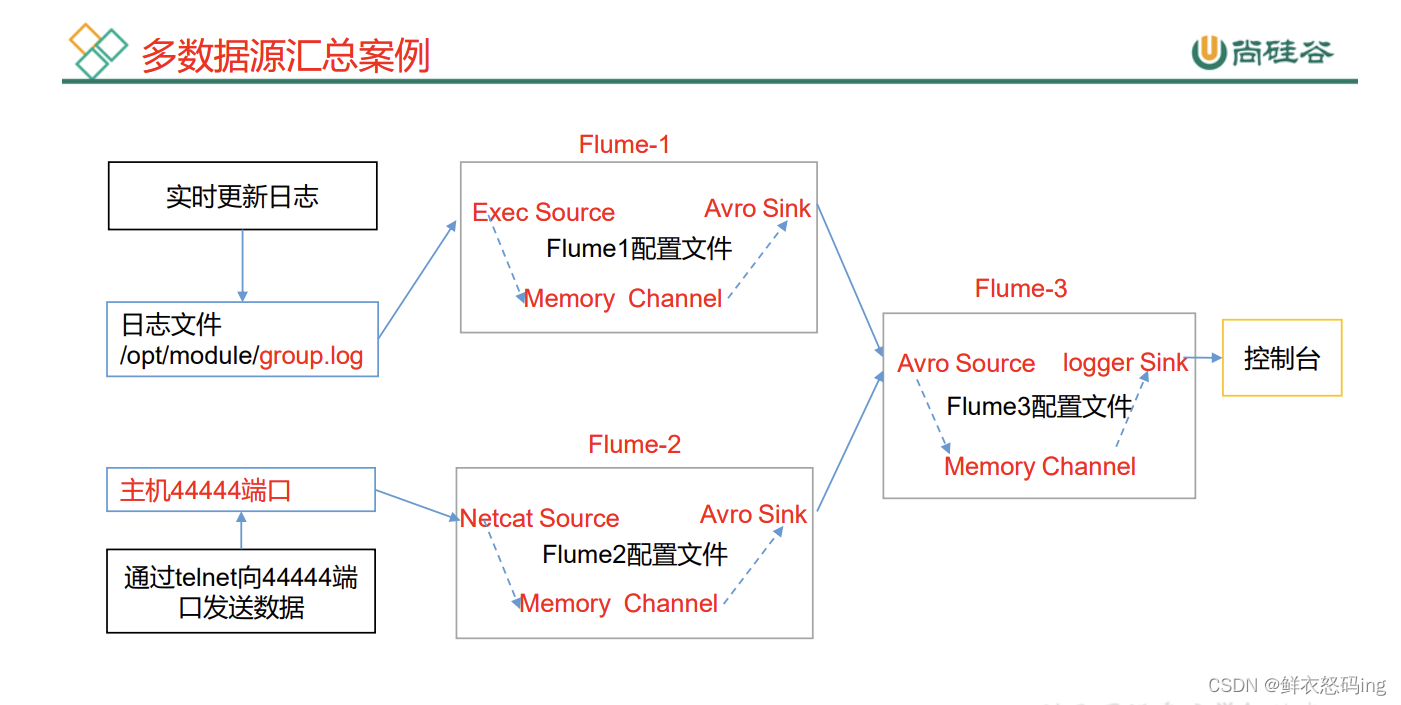
三台服务器:linux01、linux02、linux03,监控 linux03 的 job/group.log 文件和 linux02 的 44444 端口,把监测到的数据传给 linux01,在 linux01 的控制台输出。
linux03 的任务配置文件:flume3-logger-flume.conf
 1
 2
 3
 4
 5
 6
 7
 8
 9
10
11
12
13
14
15
16
17
18
19
20
|
    # Name the components on this agent
    a1.sources = r1
    a1.sinks = k1
    a1.channels = c1
    # Describe/configure the source
    a1.sources.r1.type = exec
    a1.sources.r1.command = tail -F /export/server/flume/job/group.log
    a1.sources.r1.shell = /bin/bash -c
    # Describe the sink
    a1.sinks.k1.type = avro
    a1.sinks.k1.hostname = linux01
    a1.sinks.k1.port = 4141

    # Describe the channel
    a1.channels.c1.type = memory
    a1.channels.c1.capacity = 1000
    a1.channels.c1.transactionCapacity = 100
    # Bind the source and sink to the channel
    a1.sources.r1.channels = c1
    a1.sinks.k1.channel = c1
|
linux02 的任务配置文件:flume2-netcat-flume.conf
 1
 2
 3
 4
 5
 6
 7
 8
 9
10
11
12
13
14
15
16
17
18
19
|
    # Name the components on this agent
    a2.sources = r1
    a2.sinks = k1
    a2.channels = c1
    # Describe/configure the source
    a2.sources.r1.type = netcat
    a2.sources.r1.bind = linux02
    a2.sources.r1.port = 44444
    # Describe the sink
    a2.sinks.k1.type = avro
    a2.sinks.k1.hostname = linux01
    a2.sinks.k1.port = 4141
    # Use a channel which buffers events in memory
    a2.channels.c1.type = memory
    a2.channels.c1.capacity = 1000
    a2.channels.c1.transactionCapacity = 100
    # Bind the source and sink to the channel
    a2.sources.r1.channels = c1
    a2.sinks.k1.channel = c1
|
linux01 的任务配置文件:flume1-flume-logger.conf
 1
 2
 3
 4
 5
 6
 7
 8
 9
10
11
12
13
14
15
16
17
18
19
|
    # Name the components on this agent
    a3.sources = r1
    a3.sinks = k1
    a3.channels = c1
    # Describe/configure the source
    a3.sources.r1.type = avro

    a3.sources.r1.bind = linux01
    a3.sources.r1.port = 4141
    # Describe the sink
    # Describe the sink
    a3.sinks.k1.type = logger
    # Describe the channel
    a3.channels.c1.type = memory
    a3.channels.c1.capacity = 1000
    a3.channels.c1.transactionCapacity = 100
    # Bind the source and sink to the channel
    a3.sources.r1.channels = c1
    a3.sinks.k1.channel = c1
|
自定义拦截器
案例需求
使用 Flume 采集服务器本地日志,需要按照日志类型的不同,将不同种类的日志发往不 同的分析系统。
需求分析
实际的开发中,一台服务器产生的日志类型可能有很多种,不同类型的日志可能需要 发送到不同的分析系统。此时会用到 Flume 拓扑结构中的 Multiplexing 结构,Multiplexing 的原理是,根据 event 中 Header 的某个 key 的值,将不同的 event 发送到不同的 Channel,所以我们需要自定义一个 Interceptor,为不同类型的 event 的 Header 中的 key 赋予不同的值。
在该案例中,我们以端口数据模拟日志,以是否包含”atguigu”模拟不同类型的日志, 我们需要自定义 interceptor 区分数据中是否包含”atguigu”,将其分别发往不同的分析 系统(Channel)。
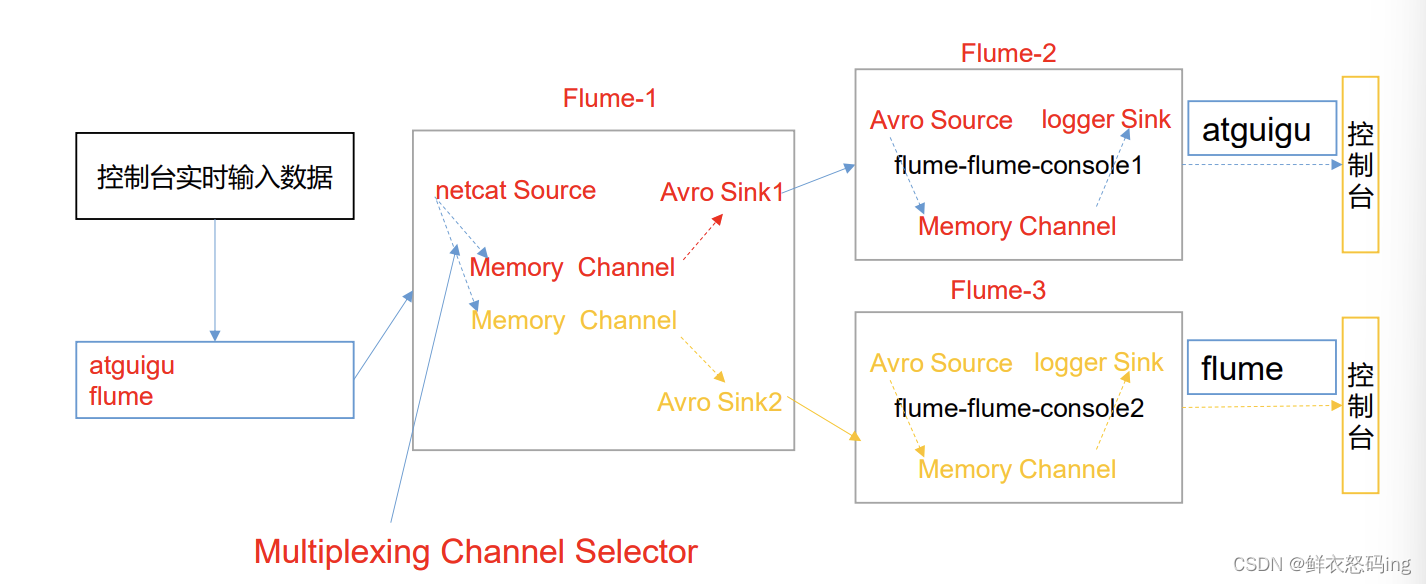
自定义拦截器打成 jar 包
 1
 2
 3
 4
 5
 6
 7
 8
 9
10
11
12
13
14
15
16
17
18
19
20
21
22
23
24
25
26
27
28
29
30
31
32
33
34
35
36
37
38
39
40
41
42
43
44
45
46
47
48
49
50
51
52
53
54
55
56
57
58
59
60
61
62
63
64
65
66
67
68
69
70
71
72
73
74
75
76
77
78
79
|
import org.apache.flume.Context;
import org.apache.flume.Event;
import org.apache.flume.interceptor.Interceptor;

import java.util.ArrayList;
import java.util.List;
import java.util.Map;


/**
 * @Author:懒大王Smile
 * @Date: 2024/4/28
 * @Time: 19:54
 * @Description:
 */

public class TypeInterceptor implements Interceptor {


    //声明一个存放事件的集合
    private List<Event> addHeaderEvents;


    @Override
    public void initialize() {
        //初始化存放事件的集合
        addHeaderEvents = new ArrayList<>();
    }

    //单个事件拦截
    @Override
    public Event intercept(Event event) {
        //1.获取事件中的头信息
        Map<String, String> headers = event.getHeaders();
        //2.获取事件中的 body 信息
        String body = new String(event.getBody());
        //3.根据 body 中是否有"atguigu"来决定添加怎样的头信息
        if (body.contains("sereins")) {
            //4.添加头信息
            headers.put("type", "sereins");
        } else {
            //4.添加头信息
            headers.put("type", "other");
        }
        return event;
    }

    //批量事件拦截
    @Override
    public List<Event> intercept(List<Event> events) {
        //1.清空集合
        addHeaderEvents.clear();
        //2.遍历 events
        for (Event event : events) {
            //3.给每一个事件添加头信息
            addHeaderEvents.add(intercept(event));
        }
        //4.返回结果
        return addHeaderEvents;
    }

    @Override
    public void close() {
    }


    //静态内部类
    public static class Builder implements Interceptor.Builder {
        @Override
        public Interceptor build() {
            return new TypeInterceptor();
        }

        @Override
        public void configure(Context context) {
        }

    }
}
|
所需依赖:
 1
 2
 3
 4
 5
 6
 7
 8
 9
10
11
12
13
14
15
16
17
18
19
20
21
22
23
24
25
26
|
<?xml version="1.0" encoding="UTF-8"?>
<project xmlns="http://maven.apache.org/POM/4.0.0"
         xmlns:xsi="http://www.w3.org/2001/XMLSchema-instance"
         xsi:schemaLocation="http://maven.apache.org/POM/4.0.0 http://maven.apache.org/xsd/maven-4.0.0.xsd">
    <modelVersion>4.0.0</modelVersion>

    <groupId>com.smile</groupId>
    <artifactId>interceptor</artifactId>
    <version>1.0-SNAPSHOT</version>

    <properties>
        <maven.compiler.source>8</maven.compiler.source>
        <maven.compiler.target>8</maven.compiler.target>
        <project.build.sourceEncoding>UTF-8</project.build.sourceEncoding>
    </properties>


    <dependencies>
        <dependency>
            <groupId>org.apache.flume</groupId>
            <artifactId>flume-ng-core</artifactId>
            <version>1.9.0</version>
        </dependency>
    </dependencies>

</project>
|
jar 包打好放到 flume 的 lib 目录下,flume 启动时会加载 lib 的所有 jar 包。
注意!!自定义拦截器的 jar 包源代码是定制的,里面的过滤拦截规则需要根据实际业务来编写,并且 jdk 最好是 1.8。
任务配置文件
inux01 服务器的 flume 配置文件 job/group4/interceptor-flume1.conf:
1 配置 1 个 netcat source,1 个 sink group(2 个 avro sink), 并配置相应的 ChannelSelector 和 interceptor。
 1
 2
 3
 4
 5
 6
 7
 8
 9
10
11
12
13
14
15
16
17
18
19
20
21
22
23
24
25
26
27
28
29
30
31
32
33
34
35
|
    # Name the components on this agent
    a1.sources = r1
    a1.sinks = k1 k2
    a1.channels = c1 c2
    # Describe/configure the source
    a1.sources.r1.type = netcat
    a1.sources.r1.bind = localhost
    a1.sources.r1.port = 44444

    a1.sources.r1.interceptors = i1
    a1.sources.r1.interceptors.i1.type = TypeInterceptor$Builder
    a1.sources.r1.selector.type = multiplexing
    a1.sources.r1.selector.header = type
    a1.sources.r1.selector.mapping.sereins = c1
    a1.sources.r1.selector.mapping.other = c2

    # Describe the sink
    a1.sinks.k1.type = avro
    a1.sinks.k1.hostname = linux02
    a1.sinks.k1.port = 4141
    a1.sinks.k2.type=avro
    a1.sinks.k2.hostname = linux03
    a1.sinks.k2.port = 4242
    # Use a channel which buffers events in memory
    a1.channels.c1.type = memory
    a1.channels.c1.capacity = 1000
    a1.channels.c1.transactionCapacity = 100
    # Use a channel which buffers events in memory
    a1.channels.c2.type = memory
    a1.channels.c2.capacity = 1000
    a1.channels.c2.transactionCapacity = 100
    # Bind the source and sink to the channel
    a1.sources.r1.channels = c1 c2
    a1.sinks.k1.channel = c1
    a1.sinks.k2.channel = c2
|
linux02 服务器的 flume 配置文件 job/group4/interceptor-flume2.conf:
配置一个 avro source 和一个 logger sink
 1
 2
 3
 4
 5
 6
 7
 8
 9
10
11
12
|
    a1.sources = r1
    a1.sinks = k1
    a1.channels = c1
    a1.sources.r1.type = avro
    a1.sources.r1.bind = linux02
    a1.sources.r1.port = 4141
    a1.sinks.k1.type = logger
    a1.channels.c1.type = memory
    a1.channels.c1.capacity = 1000
    a1.channels.c1.transactionCapacity = 100
    a1.sinks.k1.channel = c1
    a1.sources.r1.channels = c1
|
linux03 服务器的 flume 配置文件 job/group4/interceptor-flume3.conf:
配置一个 avro source 和一个 logger sink
 1
 2
 3
 4
 5
 6
 7
 8
 9
10
11
12
|
    a1.sources = r1
    a1.sinks = k1
    a1.channels = c1
    a1.sources.r1.type = avro
    a1.sources.r1.bind = linux03
    a1.sources.r1.port = 4242
    a1.sinks.k1.type = logger
    a1.channels.c1.type = memory
    a1.channels.c1.capacity = 1000
    a1.channels.c1.transactionCapacity = 100
    a1.sinks.k1.channel = c1
    a1.sources.r1.channels = c1
|
以上配置完后,在 linux01 nc localhost 44444,然而
尚硅谷 Flume P33
后面的以后再搞
自定义 Source
自定义 Sink
事务源码